Disclosure: We are independent of Anthropic and do not sell Claude licences. We build MCP servers that give AI assistants access to company systems. In the section on integration, we describe this approach as one of several options.
What is Claude for business?
Claude for business is Anthropic's AI assistant on the Team and Enterprise plans: your team works in a shared organisation with central sign-in, roles and administration, and according to Anthropic, content is not used for training by default. For developers there is also the API, which lets you build Claude into your own applications. The guide Claude API integration explains how.
Which Claude plans are available for businesses?
Anthropic offers two plans for businesses: Claude Team for 2 to 150 seats and Claude Enterprise from 20 seats via self-serve or from 50 seats via sales (according to Anthropic on the Team plan and on the Enterprise plan, as of November 2026). Both plans include single sign-on (SSO) and automatic account creation at first sign-in (just-in-time provisioning). The features that IT leadership and data protection usually ask about first, however, are only available in Enterprise.
| Feature | Claude Team | Claude Enterprise |
|---|---|---|
| Seats | 2 to 150 | from 20 (self-serve) or from 50 (via sales) |
| Single sign-on (SSO) | Yes | Yes |
| Just-in-time provisioning (JIT) | Yes | Yes |
| SCIM (user sync with your directory service) | No | Yes |
| Domain capture | Inconsistently documented, see below the table | Yes |
| Audit logs and Compliance API | No | Yes |
| Custom retention periods | No | Yes, at least 30 days |
| Custom roles (permissions per group) | No | Yes |
| IP allowlisting | No | Yes |
| Roles | Primary Owner, Owner, Admin and User | Primary Owner, Owner, Admin, User, Custom (seat- and usage-based) |
| Who can add custom connectors | Owner and Primary Owner | Owner and Primary Owner, plus members with a custom role that includes “Manage access to Libraries” |
Sources for the table, as of November 2026: plan comparison, JIT and SCIM, domain capture, custom roles, retention, connectors. We do not quote prices; they are currently listed on Anthropic's pricing page. Besides the admin features, also check seat types, usage allowances and spend controls; Anthropic describes them in its articles on the Team and Enterprise plans.
Domain capture: Anthropic's sources contradict each other here. The article on the Team plan lists “Single-Sign-On (SSO) and Domain Capture” as part of Team. The plan comparison, however, does not list domain capture for Team, and the guide to domain capture describes finding and taking over existing personal Claude accounts on your company domain as a feature for Enterprise admins. Before choosing a plan, get confirmation of what your contract includes.
When is Team enough? If you are equipping up to 150 people, sign-in via your identity provider is sufficient and the standard retention meets your internal requirements. When do you need Enterprise? If accounts should be synced automatically with your directory service (SCIM), if personal Claude accounts using a company address should be moved into the company organisation (domain capture), if your data protection team requires audit logs or custom deletion periods, or if connectors should be enabled only for specific groups. Note: according to Anthropic, connector permissions via custom roles apply only to members with the “Custom” role; members with the User, Admin or Owner roles see every connector enabled for the organisation (custom roles). If, for example, only accounting should see the connector to the finance system, the other members must also be given the “Custom” role.
Does Anthropic train Claude on our data?
No, not by default: according to Anthropic, inputs and outputs from its commercial products, i.e. Team, Enterprise and the API, are not used to train the models (Anthropic Privacy Center, as of November 2026). This commitment applies to the commercial products. For personal accounts such as Free, Pro or Max, Anthropic refers to separate consumer rules; according to the plan comparison, training there is handled via opt-out. Company work therefore belongs on the company plan, not on individual employees' personal subscriptions.
Anthropic names two exceptions. First, feedback: if someone explicitly submits feedback or reports a bug, for example with a thumbs up or thumbs down, Anthropic may use that conversation for training. With thumbs feedback, Anthropic stores the entire related conversation for up to five years; according to Anthropic, raw content from connectors and MCP servers is not included unless it was copied directly into the conversation. Second, voluntary participation in Anthropic's Development Partner Program (Anthropic on the allocation of roles).
There is a lever for the first exception: Owners can switch off the rating feature (“Rate chats”) for the organisation. Decide this before launch and put it in your internal AI policy. Otherwise, a well-meant thumbs up can put conversations containing customer data into retention for up to five years.
Where does Anthropic store data – is Claude available with EU servers?
According to Anthropic, data is stored in the USA; Anthropic does not offer an EU storage region directly (server locations according to Anthropic, as of November 2026). By default, Anthropic may route customer traffic, including the computation of responses (inference), to selected locations in the USA, Europe, Asia and Australia, unless otherwise agreed or instructed. For internal processes such as security reviews, support or incident handling, data may also be processed in countries where Anthropic or its affiliates operate. The API documentation lists only “us” as a storage region and the options “global” or “us” for inference (Data Residency).
Usage-based Enterprise organisations can additionally restrict inference to the USA. According to Anthropic, this setting governs neither the storage location nor the services you connect via connectors (US-only inference). So it does not help with keeping data in Europe.
Claude is also available via cloud platforms such as Amazon Bedrock, Google Cloud and Microsoft Foundry. If you use Claude via a third-party platform, according to Anthropic that platform's terms apply (Anthropic on the DPA). What matters is who operates the offering: for Amazon Bedrock and the Google-operated offering, according to Anthropic the endpoint or inference profile determines the region. For Anthropic-operated offerings in these clouds, such as “Claude Models on Google Cloud (Anthropic managed)”, every workspace uses “us” as its storage region (Data Residency). Check with the cloud provider itself which regions it offers for which model and what is stored there. We deliberately make no blanket promise on this.
What this means for your GDPR review
Because Anthropic stores data in the USA, using Claude with personal data is a third-country transfer that your data protection team must assess and document. Anthropic provides the contractual basis: the data processing agreement (Data Processing Addendum, DPA) with standard contractual clauses is automatically part of the Commercial Terms, so no separate signature is required. For Team and Enterprise, Anthropic acts as processor according to its own description, and your company is the controller.
- Read the DPA File the wording of the DPA and check it against your requirements for a contract under Art. 28 GDPR.
- Standard contractual clauses The DPA incorporates the EU standard contractual clauses (Modules 2 and 3) where data protection law requires them.
- Transfer impact assessment Document which types of data go to the USA, how sensitive they are and which measures reduce the risk.
- Sub-processors According to the DPA, you can object in writing to a new sub-processor on reasonable data protection or data security grounds within 15 days of notification; otherwise consent is deemed given. Decide who reads these notifications.
- Certifications Anthropic cites SOC 2 Type I and Type II, ISO 27001:2022 and ISO/IEC 42001:2023.
- Records and impact assessment Add the use to your record of processing activities and check whether a data protection impact assessment is required.
This is general guidance, not legal advice. Whether the use is GDPR-compliant depends on the purpose, data types and measures in your company. For tasks where certain data should not leave your organisation at all, a local model is the alternative. For professionals bound by secrecy, such as tax firms, § 203 StGB (German Criminal Code, professional secrecy) also applies: AI in the firm and § 203 StGB. More on data flows and permissions: Connecting AI in a GDPR-compliant way.
How long does Anthropic store chats and files?
Without a custom setting, chats, projects and artifacts in Team and Enterprise remain stored until someone deletes them (retention controls); according to Anthropic, deleted chats are usually removed from its back-end systems within 30 days, unless the law requires longer storage or it is needed to address violations (retention, deletion, as of November 2026). In detail, Anthropic distinguishes several cases:
| Case | Retention according to Anthropic |
|---|---|
| Incognito chat (on all plans, including Team) | Deleted after 30 days by default; longer in Enterprise if a custom retention period is set (incognito chats) |
| Regular chat in Team or Enterprise | Stored indefinitely without a custom period; after deletion usually removed from the back end within 30 days |
| Enterprise with a custom period | Owners or Primary Owners set a period for chats, projects and artifacts, at least 30 days. It counts from the last activity; even opening a chat counts as activity. Exclusions include Claude Design as a standalone product, Claude Tag, Claude Managed Agents and features that run Claude Code in the cloud |
| Chats in projects | The project period takes precedence over the chat period |
| Feedback submitted | The entire related conversation for up to five years |
| Flagged as a violation by safety systems | Inputs and outputs for up to two years, classification scores for up to seven years |
| API | Inputs and outputs deleted from the back end within 30 days, with exceptions |
| Zero Data Retention | Only after approval, for eligible API use and Claude Code in Enterprise, not for chat |
| Covered Models (Mythos-class models) | Separate 30-day retention; according to Anthropic, this affects organisations with Zero Data Retention. Check before use |
Sources: retention controls in Enterprise, scope of Zero Data Retention, Covered Models, incognito chats.
In practice, this means: a custom, organisation-wide retention period for regular chats exists only in Enterprise. In that case, set the chat and project periods together, because a short chat period alone does not cover chats in projects. The period is not a maximum duration from creation, because every activity restarts it. And check for every new feature whether it inherits your period; Anthropic maintains the list of exceptions in its article on retention controls.
How do you connect Claude to company systems such as DATEV, SAP or Microsoft 365?
Claude reaches company systems via connectors; technically, a custom connector is a remote MCP server, i.e. a service that provides defined tools under the open Model Context Protocol, such as “read open items”. According to Anthropic, custom connectors are possible on all plans, with at most one on the Free plan. In Team, only Owners and Primary Owners add them; in Enterprise, so can members with a custom role that includes “Manage access to Libraries” (custom connectors, using connectors, as of November 2026). The guide Claude MCP shows step by step how to set up a connector.
Authentication. A connector usually authenticates via OAuth. Alternatively, an Owner can store a fixed access key in the HTTP header; according to Anthropic, this header authentication is in beta and enabled only for a limited group of organisations (adding a connector). According to Anthropic, such a key identifies the organisation, not a person: all requests carry the same key, so it does not identify who is asking. If tools are to act on behalf of the individual person, Anthropic recommends OAuth (authentication). According to Anthropic, central sign-in via your identity provider is generally available, while sign-in issued by Claude is still in beta, both for Team and Enterprise (central sign-in).
Network path. Remote connectors connect from Anthropic's cloud, even if your team uses the desktop app. The MCP server must therefore normally be reachable from Anthropic's IP ranges over the public internet (port 443). For Enterprise, Anthropic offers MCP Tunnels on request as a research preview, so the server does not need a public endpoint (MCP Tunnels). Local MCP servers, by contrast, run in Claude Desktop via the configuration file claude_desktop_config.json (Anthropic) or as a Desktop Extension in the .mcpb format. For Team and Enterprise there is an allowlist for such extensions, which is switched off by default (allowlist, local servers).
Microsoft 365. Anthropic provides its own connector for SharePoint, OneDrive, Outlook and Teams. For business accounts, an Owner must enable it in Claude, and a Global Administrator in Microsoft Entra grants one-time consent for the tenant. Write tools that let Claude send emails, manage appointments, create files or send Teams messages are an additional step requiring separate consent from an Entra administrator. Depending on the setup date, additional confirmation rules apply to individual send tools, so review the tool permissions before launch (setup, security guide). If you need more control over individual tools, the guide Microsoft 365 MCP server describes the route via a custom server.
How we build custom MCP servers: per-person permissions and audit log
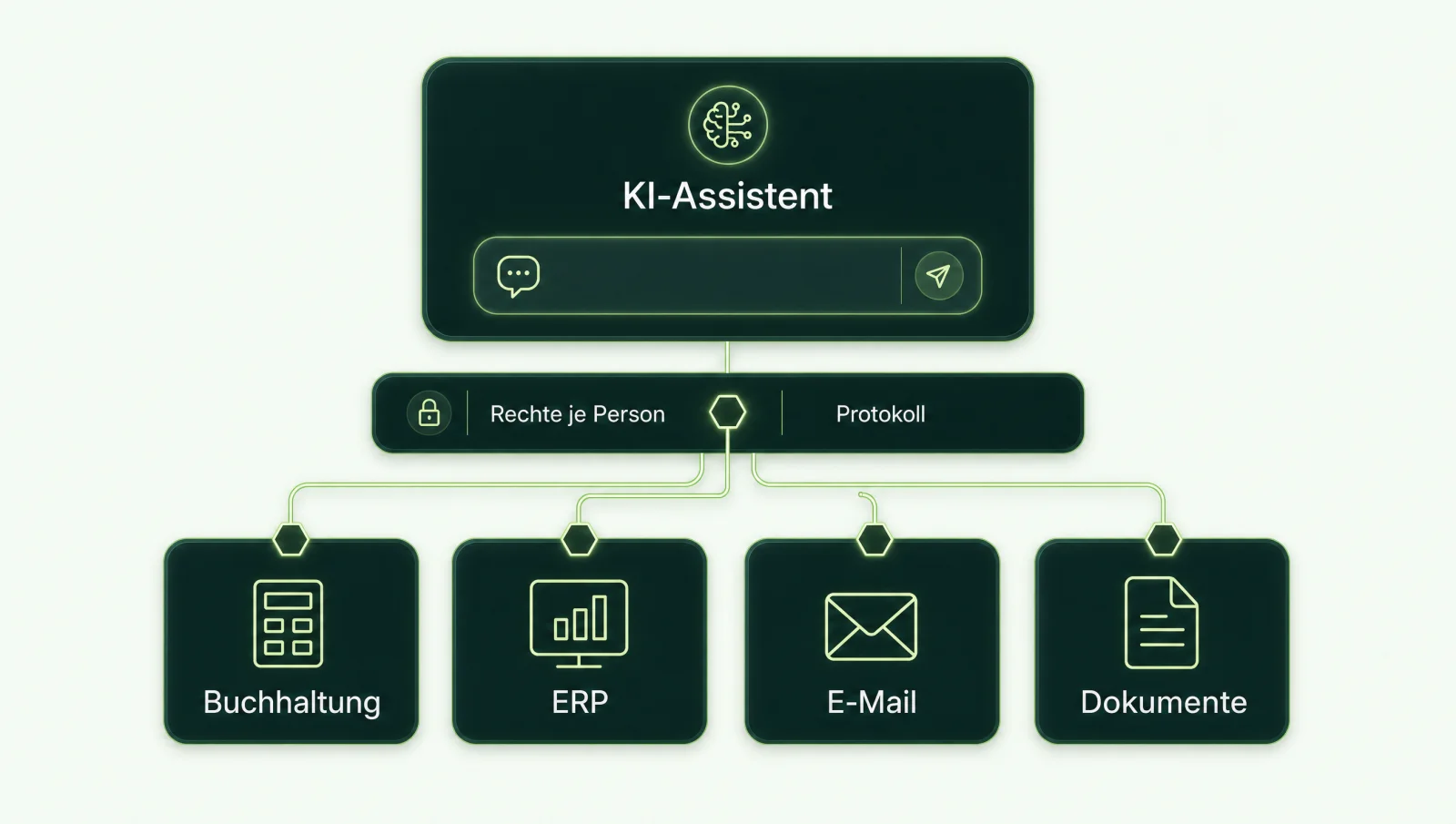
For specialist systems such as accounting or ERP, we build a custom MCP server that contains only the tools you approve. These are our build principles, not properties of MCP itself: every person signs in via your identity provider, every call runs with their permissions instead of through a shared account, and the server logs who called which tool, when, and with what result. We start with read-only tools; write tools are added only with an approval step by an authorised person. In principle, such a server can also be reused with another assistant if that assistant supports the transport (Streamable HTTP), the authentication method and the protocol features used. Background: What is an MCP server? and MCP server security and GDPR.
| System | What to bear in mind | Guide |
|---|---|---|
| DATEV | As of November 2026, there is no MCP server from DATEV itself. There are third-party offerings and custom builds. | DATEV MCP server, comparison |
| Lexware Office | Integration via the Lexware Office interface; permissions and tools are defined in a custom server | Connecting Claude to Lexware Office |
| SAP S/4HANA | The SAP API Policy restricts AI agents outside routes recognised by SAP. Clarify the route before building. | SAP MCP server |
| Microsoft 365 | Anthropic connector with Entra consent, or a custom server with fixed tools | Microsoft 365 MCP server |
Further systems, from CRM to time tracking, are collected in the overview of all MCP servers.
Your system is not listed? Tell us which software Claude should reach. We will reply in writing.
Ask a questionWhat rules does Anthropic itself set for using Claude?
In its Usage Policy, in force since 12 November 2026, Anthropic requires review by a qualified human and disclosure that AI was involved for high-risk use cases (Usage Policy, as of November 2026). The high-risk areas named in the policy include employment, for example screening, ranking or rejecting applications, promotions and performance reviews, as well as legal, medical, finance and tax, credit, insurance, housing and education. This refers to recommendations or decisions about individuals, not every activity in these sectors. There are narrowly defined exceptions for certain decisions that are exclusively favourable to the people affected.
Two further points matter for mid-sized companies. According to the policy, external chatbots and agents, for example on your website, must disclose that people are talking to an AI. And Anthropic itself warns about prompt injection: malicious MCP servers can contain hidden instructions intended to make Claude take unwanted actions, so only trusted servers should be connected (security notes). Anthropic describes the browser extension Claude in Chrome as “still risky” despite its safeguards (Claude in Chrome). The guide Prompt injection explains how to protect yourself against smuggled-in instructions.
The Usage Policy does not replace your own obligations. It is the framework Anthropic sets as a provider; employment law, data protection law and the EU AI Act apply alongside it. All notes on data protection, the EU AI Act and employment law on this page are general guidance for your planning, not legal advice.
How do you roll out Claude in your company?
We recommend five steps for rolling out Claude: contract, data protection, roles, connectors and a supported pilot. The order matters, because some settings are harder to undo after launch than to set beforehand.
- 1. Plan and contract Choose Team or Enterprise based on user management and deletion periods. File the Commercial Terms and DPA, and end company use of personal subscriptions.
- 2. Document data protection Assess the transfer to the USA, update the record of processing activities, and define which data does not belong in Claude.
- 3. Roles and settings Set up SSO, appoint a small number of Owners, and deliberately configure the rating feature and, in Enterprise, retention periods for chats and projects.
- 4. Approve connectors Allow only reviewed servers, use the allowlist for Desktop Extensions, and initially block write tools or require confirmation for them.
- 5. Training and pilot Art. 4 of the EU AI Act requires measures to ensure your team's AI literacy. Start with a pilot group and clear use cases. Record beforehand how you will measure the pilot: previous effort, quality of results, rework needed and when you will stop. Answers can be wrong or invent sources, so a human checks every result before it goes any further.
We set the timeline after the AI Check. It depends mainly on how quickly data protection and IT clarify points 2 and 4.
Claude, ChatGPT or Microsoft Copilot: which is the better fit?
Check Microsoft Copilot first if your team works mainly in Microsoft 365, ChatGPT Enterprise if storage in Europe is a requirement, and Claude if US storage is acceptable after your data protection review and your tasks match its features. The comparison becomes reliable when all three handle the same pilot tasks. Microsoft Copilot works in Microsoft 365 and, according to Microsoft, only shows company data that the person is already allowed to see (Microsoft, as of November 2026). OpenAI offers eligible new ChatGPT Enterprise customers storage of covered customer content in the EEA and Switzerland; according to OpenAI, data stored and processed outside OpenAI's infrastructure via apps, MCP or web search is not included (OpenAI). As described, Anthropic stores data in the USA. In principle, a custom MCP server can be reused with all three assistants if the respective product supports the transport, authentication method and protocol features used; Microsoft requires exactly this check (Microsoft on reusing MCP servers). Choosing an assistant is therefore not a permanent decision. You will find the detailed comparison under Claude, ChatGPT or Copilot in business, and the OpenAI side in the guide ChatGPT for business.
Sources
- Plans and administration: plan comparison, Team, Enterprise, JIT and SCIM, domain capture, custom roles.
- Data and data protection: training, retention, deletion, custom periods, Zero Data Retention, specific models, server locations, Data Residency, US-only inference, DPA acceptance, DPA, Commercial Terms, allocation of roles, certifications.
- Connectors: custom connectors, using connectors, central sign-in, MCP Tunnels, local servers, allowlist, Microsoft 365 connector, security guide, Claude in Chrome, Model Context Protocol.
- Rules: Usage Policy.
- Comparison: Microsoft Copilot, data protection, OpenAI, data residency.
All sources accessed on 19 November 2026. Vendor information changes frequently; if a statement is no longer up to date, write to info@weber-media.com. We will correct it.
Frequently asked questions about Claude for business
Is Claude GDPR-compliant?
That depends on your assessment, not on the product alone. Anthropic provides a data processing agreement with standard contractual clauses that is automatically part of the Commercial Terms, but according to Anthropic it stores data in the USA. Whether the use in your company is GDPR-compliant depends on your assessment of purpose, data types, third-country transfer and safeguards. This is general guidance, not legal advice.
Do we need Claude Team or Enterprise?
Team suits 2 to 150 seats if single sign-on is sufficient and the standard retention rules are acceptable. You need Enterprise if you require SCIM, audit logs, the Compliance API, custom deletion periods or per-group permissions via custom roles. According to Anthropic, Enterprise starts at 20 seats via self-serve.
Can Claude access DATEV?
Not out of the box, but via an MCP server that you connect as a custom connector. As of November 2026, there is no MCP server from DATEV itself; there are third-party offerings and custom builds with per-person permissions and audit logging. Our guide to DATEV MCP servers compares the options.
Is Claude available with servers in the EU?
Not directly from Anthropic. According to Anthropic, data is stored in the USA, while responses can be computed in several regions, including Europe. Via cloud platforms such as Amazon Bedrock, Google Cloud or Microsoft Foundry, their terms apply; for Bedrock and the Google-operated offering, according to Anthropic the endpoint determines the region. Check the specific regions with the cloud provider.
Does Anthropic use our company data for training?
Not by default: according to Anthropic, content from Team, Enterprise and the API is not used for training. The exception is explicitly submitted feedback; with thumbs feedback, the entire related conversation can be stored for up to five years. Owners can switch off the rating feature.
Can we set how long chats are stored?
Yes, in Enterprise. Owners set a custom period of at least 30 days. It counts from the last activity, does not apply to all products, and for chats in projects the project period takes precedence. Team has no custom period; regular chats remain stored until someone deletes them, and incognito chats are automatically deleted within 30 days.
Can everyone on the team add custom connectors?
No. In Team, only Owners and Primary Owners add custom connectors; in Enterprise, so can members with a custom role that includes “Manage access to Libraries”. In Enterprise, which connectors someone sees can only be restricted for members with the “Custom” role. Desktop Extensions for local servers can be controlled in Team and Enterprise via an allowlist, which is switched off by default.
Does our MCP server have to be publicly reachable on the internet?
For remote connectors, normally yes, because Claude connects from Anthropic's cloud. For Enterprise, Anthropic offers MCP Tunnels on request as a research preview: a tunnel service in your network establishes an outbound connection to Anthropic, the server does not need a public endpoint, and it should still require OAuth authentication itself. Local servers in Claude Desktop run on the person's computer.
Which Claude route suits your company?
In the AI Check, we clarify the plan, open data protection questions and the route to your systems in 30 minutes. Afterwards, you receive a one-page recommendation. Or write briefly what Claude should do for you, and you will receive a written assessment.
Thank you, your enquiry has arrived.
You will usually receive a written assessment by email within one working day.
Prefer to talk directly? Book a 30-minute AI Check